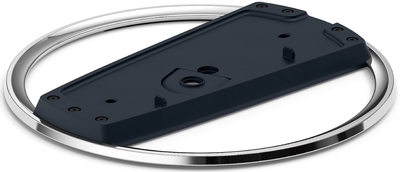
Підставка для ігрової консолі PlayStation 5
Немає підтверджених пропозицій
Наявність і строк постачання уточнюйте в магазині. Зв’язатися з Indicative
Доставка
 Самовивіз · Кропивницький
 Магазин Indicativeм. Кропивницький,
вул. Велика Перспективна, 38а
м. Кропивницький,
вул. Велика Перспективна, 38а




Оплата








Протягом 14 днів
-
Тип Підставка
-
Колір чорний
-
Комплектація документація
-
Сумісність PS5
-
Матеріал пластик
How to attach the stand to a PS5 console (CFI-2000 model group - slim)
Place your console on a soft cloth spread over a flat surface before attaching the stand.
Step 1
Go to the control centre and select Power > Turn Off PS5. The screen goes blank, the power indicator flashes white and then turns off.
Step 2
Place the PS5® console with the rear side facing up and then remove the screw cap.
Step 3
Attach the screw cap to the screw hole (marked with triangle and circle) on the stand.
Step 4
Align the screw hole (marked with cross and square) on the stand with the console’s screw hole, and then secure with the mounting screw using your hand. You can also use a coin to tighten the screw.
How to attach the stand to a PS5 console (CFI-1000 model group)
Place your console on a soft cloth spread over a flat surface before attaching the stand.
Step 1
Go to the control center and select Power > Turn Off PS5. The screen goes blank, the power indicator flashes white and then turns off.
Step 2
Fix the attachment to the stand. Insert the attachment into the raised part of the stand.
Step 3
Place the PS5 console with the rear side facing up and then remove the screw cap.
Step 4
Attach the screw cap to the screw hole (marked with cross and square) on the stand. You can also use a coin to tighten the screw.
Step 5
Align the screw hole (marked with triangle and circle) on the stand with the console’s screw hole, and then secure with the mounting screw using your hand. You can also use a coin to tighten the screw.